---
title: How to complete verification if my computer has no camera?
description: If you are using a computer without a camera or microphone, no worries - our system offers you 2 alternative ways to complete the identity verification:
---
[Skip to content](https://portal.teslapay.eu/knowledge/how-to-complete-verification-if-my-computer-has-no-camera#main-content)
English
Show submenu for translations
[Ask your question](https://portal.teslapay.eu/knowledge/kb-tickets/new?hsLang=en)
![TeslaPay\_logo.png\]](https://portal.teslapay.eu/hs-fs/hubfs/TeslaPay_logo.png?height=40&name=TeslaPay_logo.png)
Open main navigation
Close main navigation
- English
Show submenu for translations
- [Ask your question](https://portal.teslapay.eu/knowledge/kb-tickets/new)
- Open account here
Open account here
Hello. How can we help you?
- There are no suggestions because the search field is empty.
1. [Knowledge Base](https://portal.teslapay.eu/knowledge?hsLang=en)
2. [Verification](https://portal.teslapay.eu/knowledge/verification?hsLang=en)
# How to complete verification if my computer has no camera?
## If you are using a computer without a camera or microphone, no worries - our system offers you 2 alternative ways to complete the identity verification:
#### 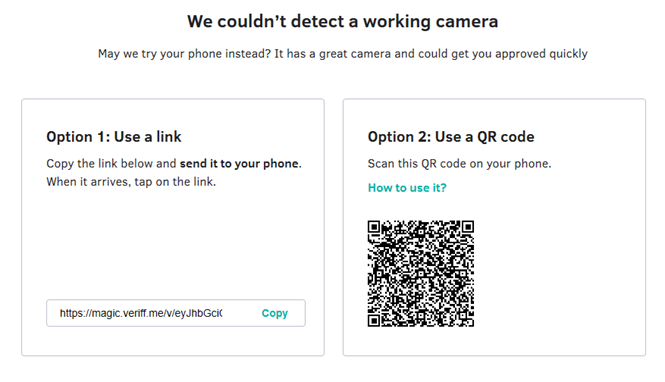
**Option 1.** Open the internet browser on your smartphone and simply paste it. Follow the instructions on your phone.
**Option 2.** Scan the QR code.
- On iOS, point the Camera app at it.
- On Android, use the Bixby-enabled camera app.
- [Getting Started](https://portal.teslapay.eu/knowledge/getting-started?hsLang=en)
- [Opening accounts](https://portal.teslapay.eu/knowledge/opening-accounts?hsLang=en)
- [Deposits to your account](https://portal.teslapay.eu/knowledge/deposits-to-your-account?hsLang=en)
- [Payments](https://portal.teslapay.eu/knowledge/payments?hsLang=en)
- [Verification](https://portal.teslapay.eu/knowledge/verification?hsLang=en)
- [Cards](https://portal.teslapay.eu/knowledge/cards?hsLang=en#main-content)
- [Card Maintenance](https://portal.teslapay.eu/knowledge/cards?hsLang=en#card-maintenance)
- [Card Issues](https://portal.teslapay.eu/knowledge/cards?hsLang=en#card-issues)
- [Other](https://portal.teslapay.eu/knowledge/other?hsLang=en#main-content)
- [Account Maintenance](https://portal.teslapay.eu/knowledge/other?hsLang=en#account-maintenance)
- [Profile Settings](https://portal.teslapay.eu/knowledge/other?hsLang=en#profile-settings)
- [Security](https://portal.teslapay.eu/knowledge/other?hsLang=en#security)
- [Feedback & Complaints](https://portal.teslapay.eu/knowledge/other?hsLang=en#feedback-complaints)
[](https://www.teslapay.eu/)
TeslaPay is the future of payments, today. We’re revolutionising the way the payment industry operates by putting you, the customer, in the driver’s seat.
Copyright © 2026, TESLAPAY